
MODBUS is used for serial communication protocol used for communicating the Modbus supporting devices with PLC. Before configuring Modbus in CP1E let us understand a little about MODBUS. What is MODBUS?
Modbus is implemented using the RS485 port and communication between the Master and slaves is through the data format. In the Modbus network, 32 slaves can be connected with a unique node ID from 1 to 247. There are many variations of Modbus like Modbus RTU, Modbus ASCII, Modbus TCP, etc.
But modbus RTU is mostly used to communicate with PLC. To set up Modbus Communication in Omron CP1E, we have to make some settings.
But modbus RTU is mostly used to communicate with PLC. To set up Modbus Communication in Omron CP1E, we have to make some settings.
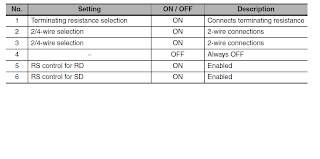
First of all, CP1W-CIF11 is required i.e. RS485 Port and you have to set its DIP switches. Since it will be a 2-wire connection so put all the DIP SWITCHES ON except Dip Switch number 4.
See the below table to know the DIP switch Setting for MODBUS Communication.
Note:- Click on the photo for a clear view.
Also, take a look at how the CP1W-CIF11 RS485 port looks. At the front side, it has 5 terminals for the connection and at the back side, it has DIP switches.

Note:- Click on the photo for a clear view.
Also, take a look at how the CP1W-CIF11 RS485 port looks. At the front side, it has 5 terminals for the connection and at the back side, it has DIP switches.
The front side has 1)RDA- 2)RDB+ 3)SDA- 4) SDB+ 5) FG namely.
Connect two wires on 1 and 2 or 3 and 4, and shield to FG. Remember to always use a shielded cable in MODBUS communication.
Connect as shown in the below diagram. Connect the other end of the wires to the device that you want to communicate in MODBUS. Always remember to connect "+" with "+" and "-" with "-".

Now all the necessary hardware settings are down, Now we just need to do some settings in PLC. Just Open CX-Programmer and select CP1E model.
Recommended Article: PLC Program for Omron Encoder Interfacing with Omron PLC
Connect as shown in the below diagram. Connect the other end of the wires to the device that you want to communicate in MODBUS. Always remember to connect "+" with "+" and "-" with "-".

Now all the necessary hardware settings are down, Now we just need to do some settings in PLC. Just Open CX-Programmer and select CP1E model.
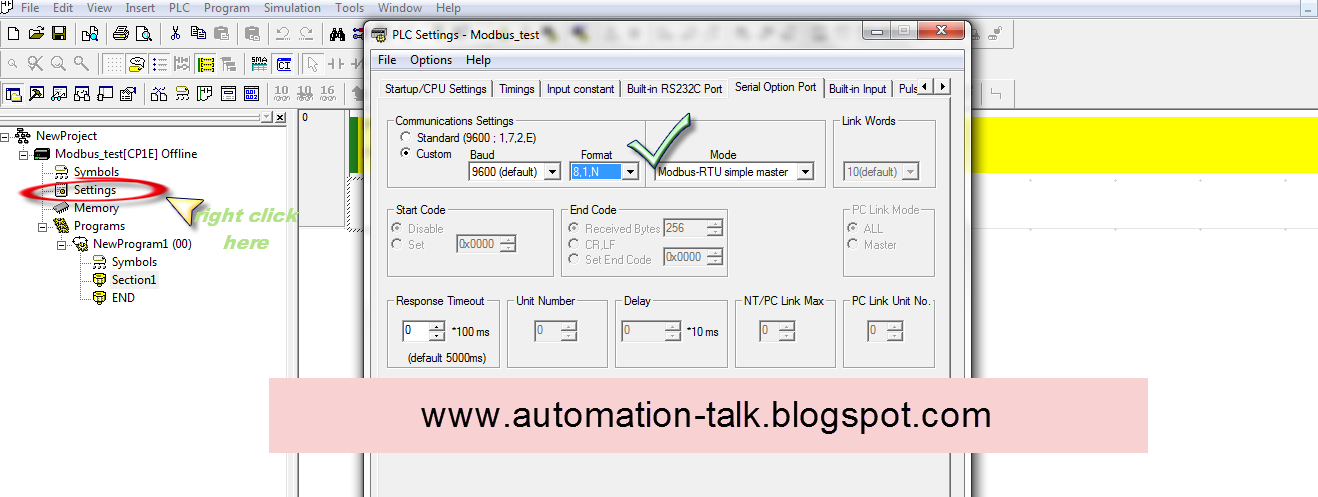
After, go to Project Workspace and right-click on settings, select the serial-option port tab, and in mode select MODBUS RTU Master and baud rate as supported by the slave side.
Remember baud rate should be the same on both sides. After making these settings save it and download settings to PLC and re-power PLC.
Hurry !! now your CP1E is ready for Modbus Communication, all you need is that connect the slave Modbus devices that you wish to connect to the MODBUS network.
See the below picture for settings.

After all these settings your CP1E is ready to communicate in MODBUS but now you have to write the Program for communication in a standard data format. In Modbus, the standard format is:-
Device address --- function code -- data -----error check
All the Modbus supporting devices follow this standard format. In Cp1E fixed DM words are defined for sending these data formats to slave devices.
DM1300-DM1399 are used for this purpose, once you write the desired format then just on the system bit A641.0 to send the above query to the desired slave device. We will discuss it in depth in the next posts as how to communicate with drives, HMI, Energy Meter, etc. in MODBUS with our PLC and how to read & write data in them.
So Keep reading here and if u have any doubts you can contact us or leave a comment and we will get back to you as soon as possible.
After all these settings your CP1E is ready to communicate in MODBUS but now you have to write the Program for communication in a standard data format. In Modbus, the standard format is:-
Device address --- function code -- data -----error check
All the Modbus supporting devices follow this standard format. In Cp1E fixed DM words are defined for sending these data formats to slave devices.
DM1300-DM1399 are used for this purpose, once you write the desired format then just on the system bit A641.0 to send the above query to the desired slave device. We will discuss it in depth in the next posts as how to communicate with drives, HMI, Energy Meter, etc. in MODBUS with our PLC and how to read & write data in them.
So Keep reading here and if u have any doubts you can contact us or leave a comment and we will get back to you as soon as possible.
Advertisements :-


Great Work buddy.
ReplyDeleteSIR,
ReplyDeleteI WANT TO COMM. CP1E WITH DELTA HMI.SEND ME THE PROGRAMMING TO SET THE DATA IN PLC
yes surely we will help you .... send us the detail ...which delta hmi you are using and how you want to communicate ....in modbus or via rs232 serial.....?
ReplyDeleteSIR,
DeleteI WANT TO COMM. CP1E WITH 2 DELTA HMI.SEND ME THE PROGRAMMING TO SET THE DATA IN PLC
i am using dop-a series hmi and omron cp1e plc. want to communicate thro modbus rs 485.
ReplyDeletedelta make dop-as series HMI and omron cp1e-n30 series plc
ReplyDeleteI think you should not have any problem in there communication.
ReplyDeleteJust connect your CP1E Modbus Connector CIF11 to Delta HMI Modbus port i.e positive to positive and negative to negative.
Its clearly mentioned in the post about the connection and dip switch settings of CIF 11 ,
ReplyDeletewhich data you want to set in PLC??
if you want PLC program ....we will make it for you ...which data words of HMI you want to read/write ...just send their address ....we will make a PLC Program Accordingly .....also tell urs mail id ....
meanwhile see our otherpost under MODBUS we have expalined more overthere ....
is urs connection in MODBUS OK?? first assure that and then proceed.
i have done external wiring as you mentioned above. but i do not know, to do programming in plc ladder .ie. to set d1300 - d1399
ReplyDeletewell as explained clearly in post, there is a fixed query format in MODBUS for read/write purpose , you have to accordingly set data in them for example to read u have to write...
ReplyDeleted1300- node id
d1301- function code of read (o3)
d1302 - number of bytes to read (o4)
d1303 - address of register to read + 1
d1304 - Number of address to read (02)
d1305 - CRC
move the data usig mov instruction
example
open cx programmer
press I and type MOV #1 d1300 and so on for remaining .
and turn on a641.0 to send query ....
may be it will help you.
External connection OK. cp1e cif11 comm.indicator flikering.
ReplyDelete# modbus standard format-send me one example
# delta hmi dop-as series- controller name(PLC-Master)
#mail id:lovindhas@intechgroup.in
d1303 - address of register to read + 1
ReplyDeleted1305 - CRC
what does it mean +1, crc
d1305 - CRC......what is crc. tell me the hmi controller name.....
ReplyDeleteCRC is for error check ...if you dont write this then also ok ...no problem .....
ReplyDeleteGenerally in MODBUS when we read the dat from slave device then we add 1 in address of register ..well it depends on slave characteristic also ...whether too add or not ...but most of cases we have to add 1 and subtract 1 while writing the value..
What HMI Controller name . You dont need it :)
ReplyDeletethank you. what must be the base port controller in hmi dop as series.(screen editor software)
ReplyDeletehmi controller name......
ReplyDeletementioned below are omron, modbus subdivison controllers
ex:omron-c series
-cj1 series
-tpm1a
modbus-ascii(master)
-984 rtu(master)
-rtu 2w (master)
-ascii hex address(master)
-rtu hex address(master)
-ascii nw (master)
-rtu nw (master)
-ascii(slave)
-rtu (slave)
-tcp/ip
in which......i want to select on particular controller. then only it work correctly. pls sort out this .
Ok Means your HMI software needs controller Name.
ReplyDeletePlease choose C series Controller. CPM1A should work.
i tried out c-series, it doesnt work.
ReplyDeletesend me plc and hmi sample program.
ReplyDeleteTry rtu hex address(master)
ReplyDeleteyou can select this if c series does'nt work...
ok. i will try this......will come back soon.
ReplyDeletethank you.May i know you name.
We are Automation Talk Team.
ReplyDeletehi
ReplyDeletecommunication done. ok.
one thing, time delay in transmitting the data and
receving data. what problem..............?
ABLE TO COMMUNICATE.
ReplyDeleteTHANKS FOR YOUR TEAM
ON ISSUE.
TIME DELAY WHILE SENDING/ RECEVING DATA.
WHILE CHECKING ERROR LOG, I FOUND CRC ERROR.
HOW TO SOLVE........
We generally don't use CRC.
ReplyDeleteAs you have said. You will require some time delay in reading and writing in Data register as you cannot read and write data same time from DM1300
to solve time issue problem
ReplyDeleteopen cx-programmer -- go to settings --select serial option port ---on the left hand bottom side ...response time out is there make it minimum
also connect shield to FG terminal in CIF11 port.
delay generally is due to noisy environment , so use shielded cable and connect to FG.
for CRC ISSUE ... see the manual of DELTA hmi ..it will be there ...if not then try putting CRC AS 778D ..not sur it will work or not as every slave device has its own crc ...so better read manual carefully.
If you like ours blog ...spread it among all automation engineers ....
ReplyDeleteLearn --->> Share ---->> Innovate
Ya sure.... i will do........
ReplyDeleteonce again thanks for your team......
Regards,
P.Lovin
how to communicate OMRON K3HB with DELTA DVP PLC
ReplyDeletelet us know how u want to communicate ... through RS232 or ....device net .. compo way ? which port u have at plc side?
ReplyDeleteTHRO COMPO WAY......... RS485 IN DELTA PLC
ReplyDeletethro compoway--------Com port 2, rs 485 in Delta PLC.
ReplyDelete@Anonymous
ReplyDeleteUse Shielded Cable , connect + of Delta Rs485 with terminal B and - with terminal A.
Command Frame as :-
STX - O2 (hexadecimal)
Node No. - Which U set in K3HB
Sub Address - Put this as 0.
SiD - Put this also as 0.
FINS-mini Command text :- Here write text command.
ETX :- Put this 0.
BCC :- It will be value resulted from EX-or Operation of values of STX to ETX.
how to use the interrupt instruction in omron cj2m plc
ReplyDeletesend sample program using schedual interrupt and inbuilt interrupt.
ReplyDeletei am using cj2m plc
regards,
p.lovin
Hi,please i need help.
ReplyDeleteI want to connect with a rs485 device with a cp1e with cif11 instaled,i've configured the cif11.
the frame for this device is:
SOH ASCII
ID
COMMAND
DATS
CHEKSUM
EXT ASCII
HOW CAN I MAKE THE CHECKSUM? AND WHERE IS THE CHECKSUM? D1305? D1306?
AND WHERE THE STOP? 03
CRC you can find in slave device manual.
ReplyDeleteCRC will be in the last word of your query to slave device.
I will connect plc omron CP1L premises inverterfrenics use rs-485 interface, how to make a ladder and settings in omron plc and settings in the inverter?
ReplyDeleteHI..
ReplyDeleteI HAVE TO COMMUNICATE OMRON PLC WITH DELTA DOP B SERIES HMI THROUGH RS232, ANY ONE HELP ME HOW TO GIVE ADDRESS IN DELTA HMI FOR OMRON PLC...
Hi R.ARUNACHALAK Kani,
ReplyDeleteSee below link.
http://www.automation-talk.info/2011/06/delta-hmi-to-plc-modbus-communication.html
pls let me know...omron CP1E-N30DR-A will work as slave with SCADA?
ReplyDeleteYes, why not.
ReplyDeletesir, i want to communicate omron drive(3g3m2) with omron plc, i don;t know the basics setting , so please give me a link from where i can startup , and communicate it for first time , so please help me
ReplyDelete@Malkeet > You are communicating through which protocol ??
ReplyDeleteWhat could be reasons for A641.02 error flag (CP1E case)? Is it wrong wiring? Wrong communication settings? I am trying to make CP1E-N (Modbus Easy via CP1W-CIF11) and Toshiba VFNC3 (Modbus RTU) speed drive communicate with eachother but get this error flag all the time. Cabling should be correct, I have tried with different comm settings, no result.
ReplyDelete@Deathster > Have you set your CP1W-CIF11 connector.
ReplyDeleteYeah 4th switch off.
ReplyDelete@deathster Hope you are using correct serial option port setting as shown in above image. The setting should be same in PLC and as well as in modbus RTU you are using. Please also check for any loose wiring if its is OK, then you can do a polling test.
ReplyDeleteAlso if every thing seems fine from PLC end then please check your drive for Modbus setting. You may have to power on and off after saving settings in drive.
Same problem with CP1E and MX2, can not get them to communicate /A641.02 is on) although port/software/physical settings are done properly. COMM led is not blinking at all. I did com port reset A526.01, no result, still no communication.
ReplyDeleteI started to think whether CP1W-CIF11 is defect and connected with Weintek HMI (via same port but Hostlink protocol and this way I get communication between CP1E and HMI, so CP1W-CIF11 is ok).
Confused.
D1352 has 0004hex message which means there is no comm board (there is!) or comm mode is not Modbus-RTU Easy Master (both CP1E and MX2 have same settings).
ReplyDeleteIs there any place where I could get explanation of error codes. I mean explanation what has caused it and possible remedies. I am doing some progress and now I get 88hex error (it means exception response from slave but what has caused this?)
ReplyDeletePlease check http://2.bp.blogspot.com/-qTMkY-2S35I/UIk4CRAJ_kI/AAAAAAAAFz8/GDefO8TI_KM/s1600/CP1E%2BDM.png for DM Words.
ReplyDeleteI we are missing some thing. It should be working. Please read how to set MX drive modbus setting. We also have same issue once.
SIR,
ReplyDeleteI WANT TO COMM. CP1E WITH CONZERV EM6433(ENERGY METER).SEND ME THE PROGRAMMING TO READ THE DATA IN PLC...PLEASE REPLAY ASAP
@Kamal,
ReplyDeletePlease check below link. I am sure it will help you.
http://www.automation-talk.info/2010/12/conzerv-energy-meter-em6436-modbus.html
How can I do for have my CP1E-NA20 as a Modbus SLAVE ??
ReplyDeleteAndres Please check above steps.
ReplyDeleteI did it, but as you can see the article explains only the Master side configuring the serial port as MODBUS RTU MASTER. How about the client (slave) side? How can I configure a PLC CP1E as Client ?.
ReplyDeleteHi can you help me? i done modbuss connection using omron cp1e and plc can read pv value from temperature controller. how can i do to plc read data for sv from TC. Thank you
ReplyDeletecan you explaine how to communicate omron cp1e n60 plc with delta vfd-L series with programme or with example
ReplyDeletemy mail id
sukantanayak1979@gmail.com
thank you
I want to use a cp1e nn0 plc with mach3.
ReplyDeleteany programs or with examples that can help me will be appreciated.
owenpattrick@yahoo.com
Thanks
please send me the addressing of all the parameters for modbus communication in omron cp1h plc to communicate with any ac drive... and also the format in which we have to write the program
ReplyDeletehello All, good day.
ReplyDeletewe are using a PLC omron CP1H with card RS232 to communicate a a Master IHM via Modbus RTU.
could you recommend us the most used FB modbus RTU slave for this case. if you have any example, please send us.
regards
htorresc@msn.com
Please read our article on setting Modbus for CP1H at http://www.automation-talk.info/2010/11/modbus-settings-for-omron-plc-cp1h.html
Deletehi
ReplyDeleteplease someone help me how should i read set of values coming from external device and how to store those values in memory.i need a program.
I can communicate with a single 3G3MX2 drive I am using the registers D1300 to D1304. But How can I communicate with multiple drives at a time?
ReplyDeleteHi
ReplyDeleteI have the Modbus RTU device. it is supported by Modbus RTU protocol via RS485 communication.
I have successfully connected this device to HMI NB10W-TW01B.
Now I want to connect PLC CP1L-EM to this device and get data from device. I do same anything like this post above, i also turn on bit A640.00 in Cx-Programer but it not work.
This is the wiring diagram:
Sensor PLC CP1L-EM
RS485A+ -------------------------- RDB+
RS485B- -------------------------- RDA-
I think the problem is "Device address --- function code -- data -----error check"
I don't understand about this
So what should i do? Can you support me, please, thanks
Have made correct ladder login to get values from Sensor?
ReplyDeleteCheck above comments, it may help you.
d1300- node id
d1301- function code of read (o3)
d1302 - number of bytes to read (o4)
d1303 - address of register to read + 1
d1304 - Number of address to read (02)
d1305 - CRC
move the data usig mov instruction
example
open cx programmer
press I and type MOV #1 d1300 and so on for remaining .
and turn on a641.0 to send query ....
The adress of sensor from 11 to 17. After connected sensor to HMI and set up parameter for them, in NB designer, i used " Number display" to get data from Sensor. In component Number Display, i used "4X11, 4X12.......4X17" to get data and data will display on HMI.
DeleteWith PLC, i follow your direction:
d1300- node id
d1301- function code of read (03)
d1302 - number of bytes to read (04)
d1303 - address of register to read (11) [because 11 is adress of sensor ]
d1304 - Number of address to read (06) [because adress from 11 to 17 ]
d1305 - CRC
Turn ON bit A640.00, A641.00 also, but after that bit A640.02 and A641.02 is ON
it not work
is it right??
Looks correct, we will request to check everything from starting. Connections, PLC logic, MODBUS.
Deletecan you give an example code for connecting between plc cp1l-em to modbus RTU devices?, please, i think it helpful to me
ReplyDeletehi.. can anyone help me how to read data from Weighing indicator.. they using Rs485 and I using cp1e n30 and the option board cp1w cif11.. all the setting is on position except no 4..switch off.. either have any program to read reviews data..
ReplyDeleteHey got communication done.. .i using yaskawa v1000 drive and cp1l Plc.. .i want to change frequency of drive via Plc... But I'm confused what block I should use and which address please help me with sample
ReplyDeleteHello, I am currently doing a project to read and write PLC (CP1E-N20) coil from my PC using HMI software (Indusoft). I want to try communicate using MODBUS RTU, with PLC as the slave. PC are connected via Serial-USB cable to the PLC built-in RS232 port. Can email me an example PLC ladder code/program I can try? My email is umar9876@yahoo.com. Thank You.
ReplyDeleteDear Automation -talk
ReplyDeleteCould you please sent me a sample PLC programming for read and write data from two power meter using modbus ?
I'm using CP1E PLC
my email : spartan.sukma@gmail.com
Best Regards
Sulman
I want omron cp1e as master and nb design as slave via rs 485.And also display some digit inn hmi or high a bitlamp. what will be the program in cx prgrammer. I try it but does not display anything in hmi.
ReplyDeletecan u give me an example please i have allen bradely inverter iwill connect it with cp1e you can change its speed from the adress 8194
ReplyDeleteHello, 'AT ' Can you help me about ''d1302: Number of bytes to read (04)'' mean.Plz explain me this
ReplyDeleteIs it possible to make cp1e plc as modbus slave through cif11 on rs 485?
ReplyDeleteplz suggest what to write in the program to do so as i have to give data to bms on rs485 modbus?
Admin..how do i connect 2 device via rs485 modbus plc CP1E.
ReplyDelete